IT REVIEWS |

|
|
What is Real-Time IM?
The Real-Time Instant Messaging (IM) feature offers a better-than-before IM experience for everyone. Built with guidance from Gallaudet University and the Trace Research and Development Center at the University of Wisconsin-Madison, this feature is available in AIM 7.
Real-Time IM lets you see what the other person is typing in real-time (as it is being typed) right on your IM window. You don't have to wait for the message to be sent to be able to read it.
This feature also enables visually impaired users to respond and react to the message as the typed words are converted from text into speech.
FAQs
What are the minimum requirements for Real-Time IM?
Unfortunately, Real-Time IM does not yet work with older versions of the AIM software, iChat, or AIM for Mac. You and your buddies need to use AIM 6.8 or higher to be able to use Real-Time IM.
Note: Real-Time IMs are logged only after they have been sent. They are not logged as they're being typed. Read our online help article Save IM sessions using the AIM software to learn more about IM logging.
How does instant messaging work?
Real-Time IM directly connects your PC to your buddy's PC so that you and your buddy can send and receive instant messages in real-time. This is also called Direct IM connection.
Important! Please accept Direct IM connections only from people you know.
How do I use Real-Time IM?
- Start an IM session with a buddy.
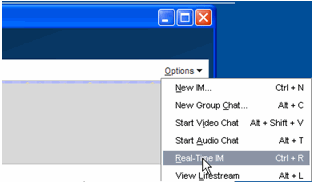
- At the top-right corner of the IM window, click Options or Menu (depending on which version of AIM 7 you're using) and then click Real-Time IM.
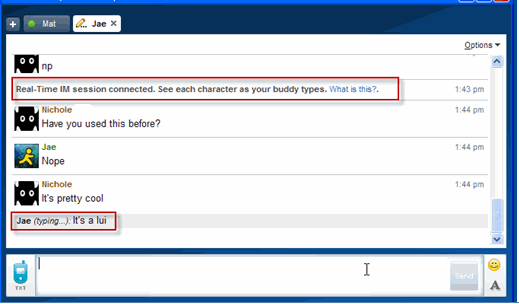
- Your buddy will be sent an invitation for Real-Time IM. Once your buddy accepts the invitation, both of you can send and receive IMs in real-time.
- When your buddy starts typing, you will see each letter as it is being typed. In the IM window, (...typing) is displayed next to your buddy's Username.
- Once the IM is sent, it will appear as normal. Note: To turn off Real-Time IM, press Ctrl and R on your keyboard. A notification stating that the session has ended will appear in the IM window.
Source: help.aol.com
